
A New Password Generator: Passphrases, Random Passwords, and PINs
TL;DR: The built-in password generator has been rebuilt from scratch across all editions of Password Pusher. Three generation modes — passphrases in five languages, random passwords, and PINs — replace the old syllable-based generator. A new POST /api/v2/generate endpoint makes it scriptable. Every result includes an entropy estimate. Password Pusher Pro adds admin policy controls: set organization-wide defaults, disable the generator entirely, or lock the configuration so users can’t override your security policy.
Three Generation Modes
The generator now supports three modes, selectable from a tabbed interface in the configure modal or via the API:
Passphrase — Draws from curated word lists in five languages: English, Spanish, French, German, and Italian. You configure the word count (3–10), separator character, whether to capitalize words, and whether to append random digits or a symbol. A default configuration produces something like Bright-Copper-Falcon-42.
Password — Generates random strings with granular control: length (4–128 characters), character classes (uppercase, lowercase, digits, symbols), an option to avoid ambiguous characters (I, l, 1, O, 0), and four character set presets — ASCII, Latin (includes accented characters), Cyrillic, and Greek.
PIN — Numeric codes from 4 to 12 digits. Straightforward.
All three modes use Ruby’s SecureRandom for generation — cryptographically secure randomness, not Math.random.
The API
The biggest change for automation workflows: generation is now server-side and accessible through a new endpoint.
POST /api/v2/generate
A passphrase request:
{
  "type": "passphrase",
  "language": "en",
  "word_count": 5,
  "separator": "-",
  "capitalize": true,
  "number": true
}
A random password request:
{
  "type": "password",
  "length": 24,
  "uppercase": true,
  "lowercase": true,
  "digits": true,
  "symbols": true,
  "avoid_ambiguous": true
}
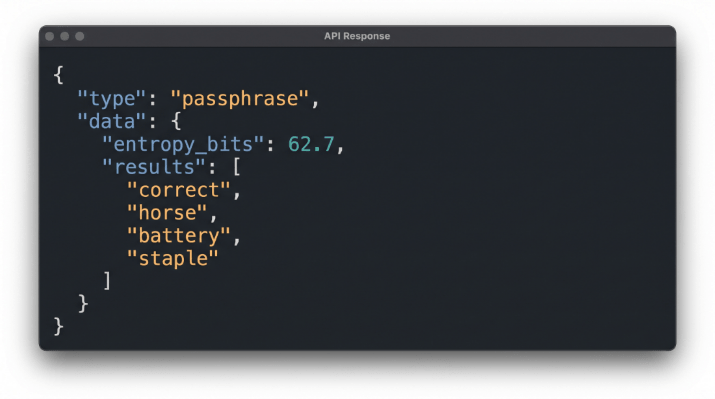
Every response includes an entropy estimate and supports batch generation (up to 10 at a time via the count parameter):
{
  "type": "passphrase",
  "language": "en",
  "entropy_bits": 62.7,
  "results": [
    "Bright-Copper-Falcon-Timber-42"
  ]
}
The endpoint is rate-limited to 30 requests per minute per user (or per IP for anonymous callers). GET /api/v2/version now reports the generator capability under features.password_generator, so integrations can feature-detect it.
Entropy Transparency
Every generation — in the UI and the API — reports an entropy estimate in bits. For passphrases, entropy depends on word list size, word count, and whether numbers or symbols are appended. For passwords, it’s calculated from the effective character pool size and length. For PINs, it’s length * log2(10).
If your security policy requires a minimum entropy threshold, you can verify it at generation time rather than guessing whether a particular configuration meets your requirements.
Admin Controls in Password Pusher Pro
On pwpush.com and Self-Hosted Pro, workspace administrators get two additional policy controls:
Enable / Disable — Turn the generator off entirely. When disabled, the UI is hidden and the API returns 403. Useful for organizations that mandate an external password manager and don’t want an alternative generation path.
Lock Configuration — Keep the generator available but prevent users from changing the defaults. The Configure modal is hidden, and the API ignores option overrides (batch count still works). This lets you set organization-wide standards — a specific passphrase word count, required character classes, minimum length — and enforce them.
On the hosted service, these controls live in Workspace Policy. On Self-Hosted Pro, they’re in Application Policies in the admin panel, and the generation defaults are configured there rather than through environment variables.
Availability
pwpush.com — Live now for all plans, including free accounts. Admin policy controls are available on paid workspaces.
Self-Hosted Pro — Available in the next Self-Hosted Pro release. Policy controls are managed through the admin panel.
OSS Password Pusher — Available in v2.13.0. Pull the latest Docker image and restart:
docker pull pglombardo/pwpush:latest
For Self-Hosted OSS Deployments
If you’re running the open source edition, the old syllable-based environment variables are removed in v2.13.0:
PWP__GEN__HAS_NUMBERS, PWP__GEN__TITLE_CASED, PWP__GEN__USE_SEPARATORS, PWP__GEN__CONSONANTS, PWP__GEN__VOWELS, PWP__GEN__SEPARATORS, PWP__GEN__MAX_SYLLABLE_LENGTH, PWP__GEN__MIN_SYLLABLE_LENGTH, PWP__GEN__SYLLABLES_COUNT
If you haven’t customized these, the upgrade is seamless — the new defaults work out of the box.
If you have customized them, here are the replacements:
| Setting | Environment Variable | Default |
|---|---|---|
| Default mode | PWP__GEN__DEFAULT_TYPE |
passphrase |
| Passphrase language | PWP__GEN__LANGUAGE |
en |
| Passphrase word count | PWP__GEN__PASSPHRASE__WORD_COUNT |
4 |
| Passphrase separator | PWP__GEN__PASSPHRASE__SEPARATOR |
- |
| Passphrase capitalize | PWP__GEN__PASSPHRASE__CAPITALIZE |
true |
| Passphrase append numbers | PWP__GEN__PASSPHRASE__NUMBER |
true |
| Passphrase append symbol | PWP__GEN__PASSPHRASE__SYMBOL |
false |
| Password length | PWP__GEN__PASSWORD__CHARACTER_LENGTH |
16 |
| Password uppercase | PWP__GEN__PASSWORD__UPPERCASE |
true |
| Password lowercase | PWP__GEN__PASSWORD__LOWERCASE |
true |
| Password digits | PWP__GEN__PASSWORD__DIGITS |
true |
| Password symbols | PWP__GEN__PASSWORD__SYMBOLS |
true |
| Password avoid ambiguous | PWP__GEN__PASSWORD__AVOID_AMBIGUOUS |
true |
| Password charset | PWP__GEN__PASSWORD__CHARSET |
ascii |
| PIN length | PWP__GEN__PIN__DIGIT_COUNT |
6 |
Self-Hosted Pro users do not need to set these environment variables — defaults are managed through the admin panel.
Thank You
This release closes four community issues that go back years. Thanks to @huiguang-liang for the original random-password request in #217 (filed September 2021), to @pett-j (#2322) and @shnsys (#2343) for pushing for passphrases in 2024, and to @micahrothvirtuoso-dotcom (#4251) for reinforcing the use case this year. Community input drives what gets built — this feature is a clear example.
Peter Giacomo Lombardo Founder & Principal, Apnotic · Creators of Password Pusher