
Self-Hosted Pro v1.8.0: Color Skins, Rebuilt Forms, and More
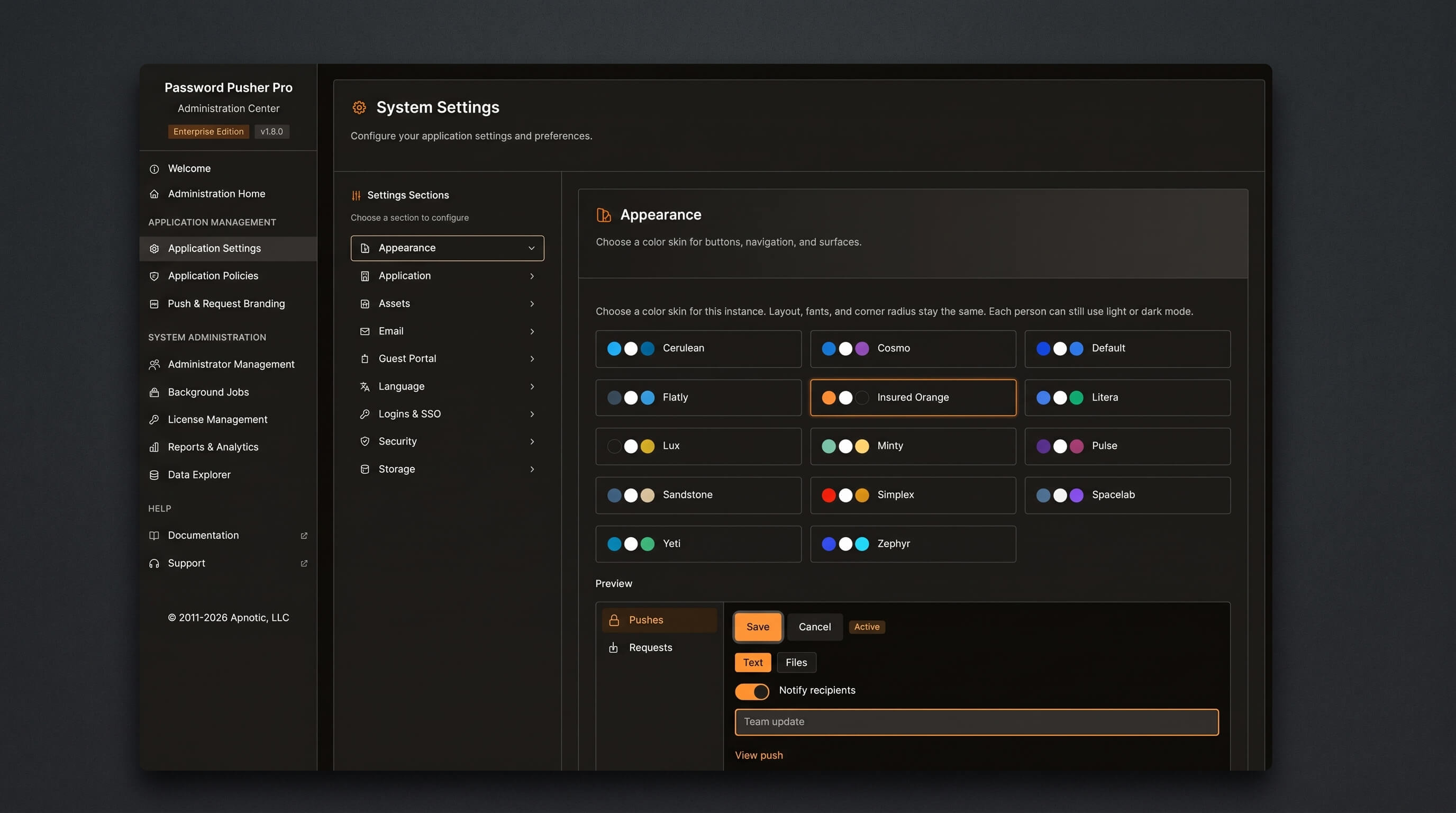
TL;DR: Self-Hosted Pro v1.8.0 adds instance-wide color skins (nine curated palettes, admin-configurable with live preview), a rebuilt push and request form with an inline unlock phrase generator, and the ability to use Authenticated Recipients without triggering Auto-Dispatch email delivery. Hosted workspaces get a workspace-level default email language.
Color Skins (Self-Hosted Pro)
Instance-wide color skins are now configurable in the Administration Center under Appearance. Nine palettes ship in the v1.8.0 image — eight Tailswatch-derived themes plus a custom Insured Orange — and a live preview mode shows the palette applied across the UI before you commit to it. Each skin sets the accent, surface, and card colors site-wide; per-user light and dark mode preferences are preserved alongside it.
The skin is stored as a single application setting and applied via a data-skin attribute on the root HTML element. There are no external CDN dependencies, no database migration, and no additional browser download. Set it once in the Administration Center and it applies immediately across all users on your instance.
This feature is Self-Hosted Pro only. Color skins are not available on pwpush.com.
Rebuilt Push and Request Forms
The push and request creation forms have been reorganized into a single-column layout. The primary content area comes first, followed by a shared settings block — expiration, unlock phrase, name, note, recipients, and additional options — with one full-width submit button at the bottom. The old two-column layout and the duplicate header submit buttons are gone.
Several labels have been rewritten. “Passphrase lockdown” is now “unlock phrase.” The view limit and recipient fields use clearer copy. The unlock phrase field gains an inline generator that produces a passphrase, clears it, or copies it to the clipboard, reusing the existing password generator under the hood. Password managers (Bitwarden, 1Password, LastPass, Dashlane) are now blocked from auto-filling the name and recipient fields — a consistent source of accidental data entry.
This change is live on pwpush.com and ships in Self-Hosted Pro v1.8.0.
Authenticated Recipients Without Auto-Dispatch
Authenticated Recipients and Auto-Dispatch email delivery are now independent. Previously, adding a recipient email to the allowlist — which triggers a one-time OTP verification before the secret is revealed — also caused Password Pusher to auto-email the secret link to that recipient. That coupling made sense in the initial implementation but created friction when you wanted the access gate without automated delivery.
Starting with this release, a new notify_recipients flag (default true, preserving existing behavior for all current users) controls whether the creation email fires. You can now add recipient emails for allowlisting and OTP verification while leaving notify_recipients disabled, so the delivery channel stays in your control and Password Pusher handles only the access gate.
The flag is available in the web form (labeled Notify), in API v2 on push and request create, and through workspace and admin policies: enable_notify_recipients, notify_recipients_default, and the equivalent pull_* variants for requests.
This change is live on pwpush.com and ships in Self-Hosted Pro v1.8.0.
Default Email Language per Workspace (Hosted)
Hosted workspaces can now set a default language for all outbound emails — push notifications, request invitations, recipient verification codes — from Workspace → Email language. The setting applies workspace-wide so members do not need to pick a language on each push or request. A per-send language choice still overrides the workspace default.
This covers all workspace-generated emails, including invitations and request-response notices. Free workspaces can set the language for invitation emails; recipient notification emails remain a paid feature.
Self-Hosted Pro continues to use the Administration Center → Default Language setting. The workspace email language value is present in the v1.8.0 codebase but has no effect on self-hosted deployments.
Bug Fixes
- TLS healthchecks (Self-Hosted Pro): Self-hosted deployments that terminate TLS at the container level now pass healthchecks correctly in the v1.8.0 image.
- Color skin in Docker images (Self-Hosted Pro): Theme swatches are preserved when building Docker images. Earlier builds could ship the default palette regardless of the configured skin.
- Feature-Policy header warnings: Legacy
Feature-Policyconsole warnings in the browser developer tools have been removed. - Skin persistence: The saved color skin now correctly persists after saving changes in the Appearance settings panel.
Availability
Self-Hosted Pro v1.8.0 is available now as a Docker image via the standard update path. Full deployment documentation is at docs.pwpush.com.
pwpush.com (hosted) has already shipped the rebuilt forms, Authenticated Recipients decoupling, and workspace email language default. Color skins are not available on the hosted service.
For questions or issues, reach us at support@pwpush.com.
Peter Giacomo Lombardo Founder & Principal, Apnotic · Creators of Password Pusher